
Lets talk layouts
Flutter is predominantly if not exclusively used to write web or mobile applications, both of which have a significant user interface (UI) component to them. Generally speaking, when we make our code available to other researchers at most they will get a README file that will explain the setup and quirks of your code. Even if you include extensive documentation writing a UI is a very different problem.
We will not go into how to approach the design of your application as design tools and user-centric design would be courses in of themselves. Instead, we will just focus on the tools already in Flutter that are used to build a UI.
As with just about everything in Flutter you build your UI out of widgets. Some of them will have a visual component associated with them such as icons or text but others are strictly used to define the placement or alignment. The former we will refer to as visual widgets the latter as layout widgets. Examples for layout widgets include containers, columns, and rows. All layout widgets will take at least one child (Center, Container) or multiple children (Row, Column…..etc.) who inherit the properties defined in their parent.
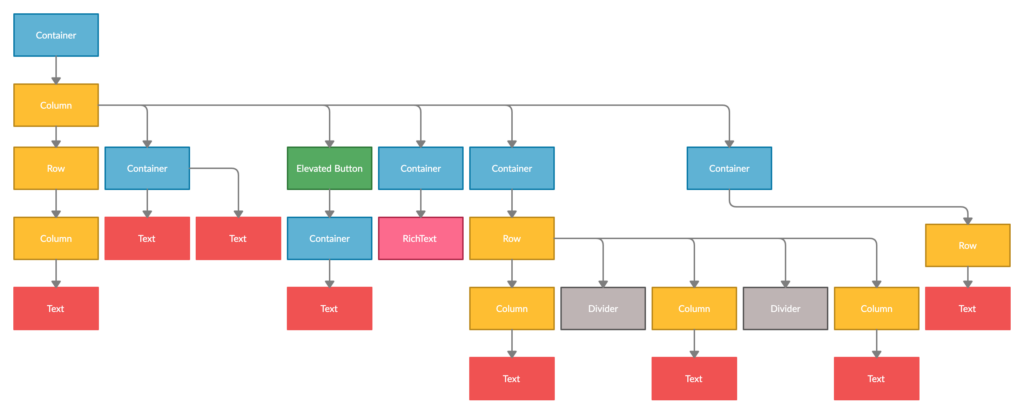
By nesting layout and visual widgets, you can form complex widget trees. In the example below, we show you the simplified widget tree of the CREDO detector page layout (excluding app and navigation bars). You will notice we used quite a few containers. In the real code, these containers have a lot of additional information regarding margins and padding which gets passed to the child widget.
MaterialApps and Scaffolds
Material Apps is a predefined class provided to you by flutter. It wraps together a number of commonly used widgets for easy usages, such as Scaffold and Navigator.
Scaffold is particularly useful when building your first app as it provides extra structure and includes pre-made app elements such as app bars and drawers. When first initializing a scaffold it will automatically generate a field for the app bar and the body of your page.
While Material Apps are very helpful they are not a necessity. It is completely possible and sometimes preferable to work without them.