Exercise 2 – Navigation and Pages
Many apps do consist of just one page that updates as the user interact with it but for larger/more complex applications more pages are a definite must.
In Flutter, to move between pages you use a Navigator. In its simplest form Navigator.push() and Navigator.pop() let you move between two pages seamlessly.
For the sake of legibility, if you have several pages, we recommend using named routes as demonstrated in this Flutter Cookbook.
Exercise:
Generate a simple multi-page app to navigate through. It should include:
- at least 6 different pages
- more than one option to navigate to from at least 3 pages
- some dead-end pages that don’t lead anywhere but back
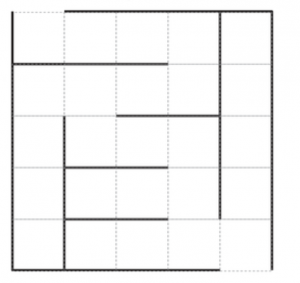
We prepared a maze layout for this for you to work on (i.e each square is a page) and generate a walk-through. However, you are welcome to use a different idea you may have for this project.